Circle Vend logo

The platform we built to run our own routes.

Circle Vend is the vending management software from the team at Vending Circle. Machines sync themselves, pre-kits build themselves, drivers get their routes and totes, customers get a real help desk — and month-end commissions come out clean. Built on live routes — tested on a 7-figure vending operation. Now open to operators everywhere.

Free to start. Operators who join now get an additional month free before launch billing begins.

Get it on Google Play

Three apps and a spreadsheet is not a system.

Every operator knows the dance: one app for the machines, another for the drivers, a spreadsheet for inventory, and a prayer at month-end for commissions. Circle Vend replaces the dance with one platform that runs the whole operation — because it's the platform a working operator built when the dance stopped working.

Everything Circle Vend does

Here is the whole platform, area by area — every capability below is live and running on real routes today.

Machines & telemetry

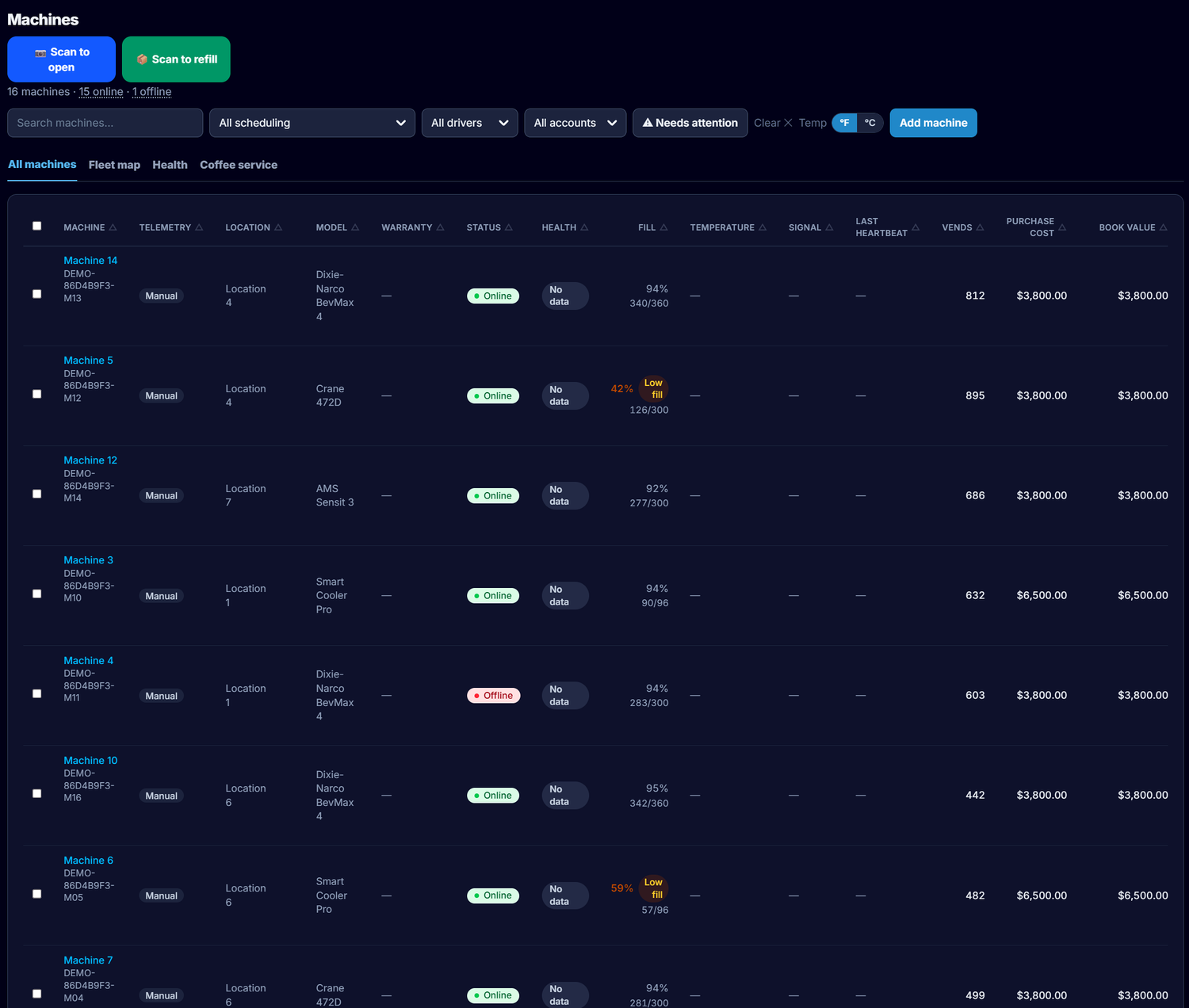
  • Smart coolers that sync themselves — HaHa, Qingo, SandStar, XMAI and Micromart cabinets sync sales, inventory and machine health automatically. No manual imports, no stale numbers.
  • Traditional machines covered too — Nayax and Cantaloupe readers report sales and stock on their own; Cantaloupe machines push every sale in as it happens, and a Fill button after a restock anchors a Nayax machine's counts back to capacity.
  • Any DEX machine — DEX reads land as dated, per-selection sales. A machine's first read sets its baseline and books zero history, so a second-hand machine's past life never shows up as your revenue.
  • DEX and a live feed never double-count — on a machine with both, the live feed is the per-sale truth and DEX books only what the feed missed.
  • Live fleet status — every machine shows online or offline as it changes, and each machine keeps its own uptime history: outages, longest outage, 30-day uptime.
  • Offline alerts that don't cry wolf — you get an email and a push when a machine stays offline, and one when it's back. A dead provider login alerts immediately, because that one never fixes itself.
  • Machine health & temperature — a health score per machine, temperature monitoring with history, telemetry-gap and card-reader checks, and cabinet alerts, all in one place.
  • Circle Vend Shield — every machine is monitored around the clock by default, and you choose which ones. Shield alerts you the moment a machine goes offline or runs hot, and with fix actions turned on it can automatically restart a machine and verify it's back — before a dead machine costs you a day of sales.
  • Remote control — open a door, reboot, turn cooling on or off, push a temperature or a corrected stock count from the office, wherever the provider supports it. Every action is logged.
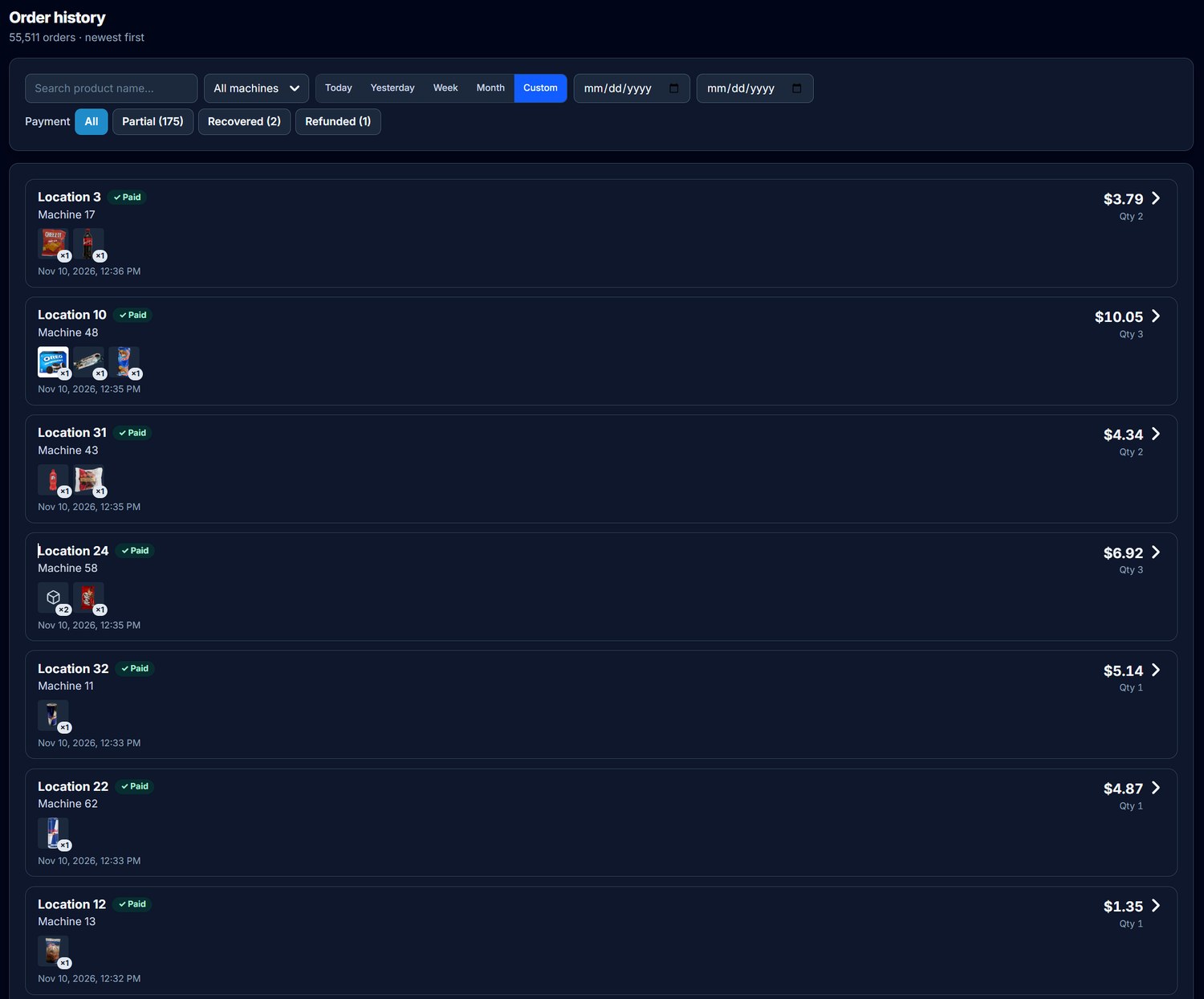
  • Abnormal orders, decided by you — watch the order video, compare it against the machine's most recent service photo, and pick what was actually taken; the correction goes back to the provider and is verified there. An abnormal can never be dismissed — a person decides every one.
  • Pre-auth tracking — an order that only captured a pre-authorization is its own category, counted at what was actually collected, and marked recovered when the rest settles. It never inflates your sales and never hides.
  • VendingMachineStatus.com — the public uptime board: anyone can see whether the connected cooler fleet is up, in percentages only, never anyone's machine counts. Operators can join free to watch only their own fleet.

Planograms & pricing

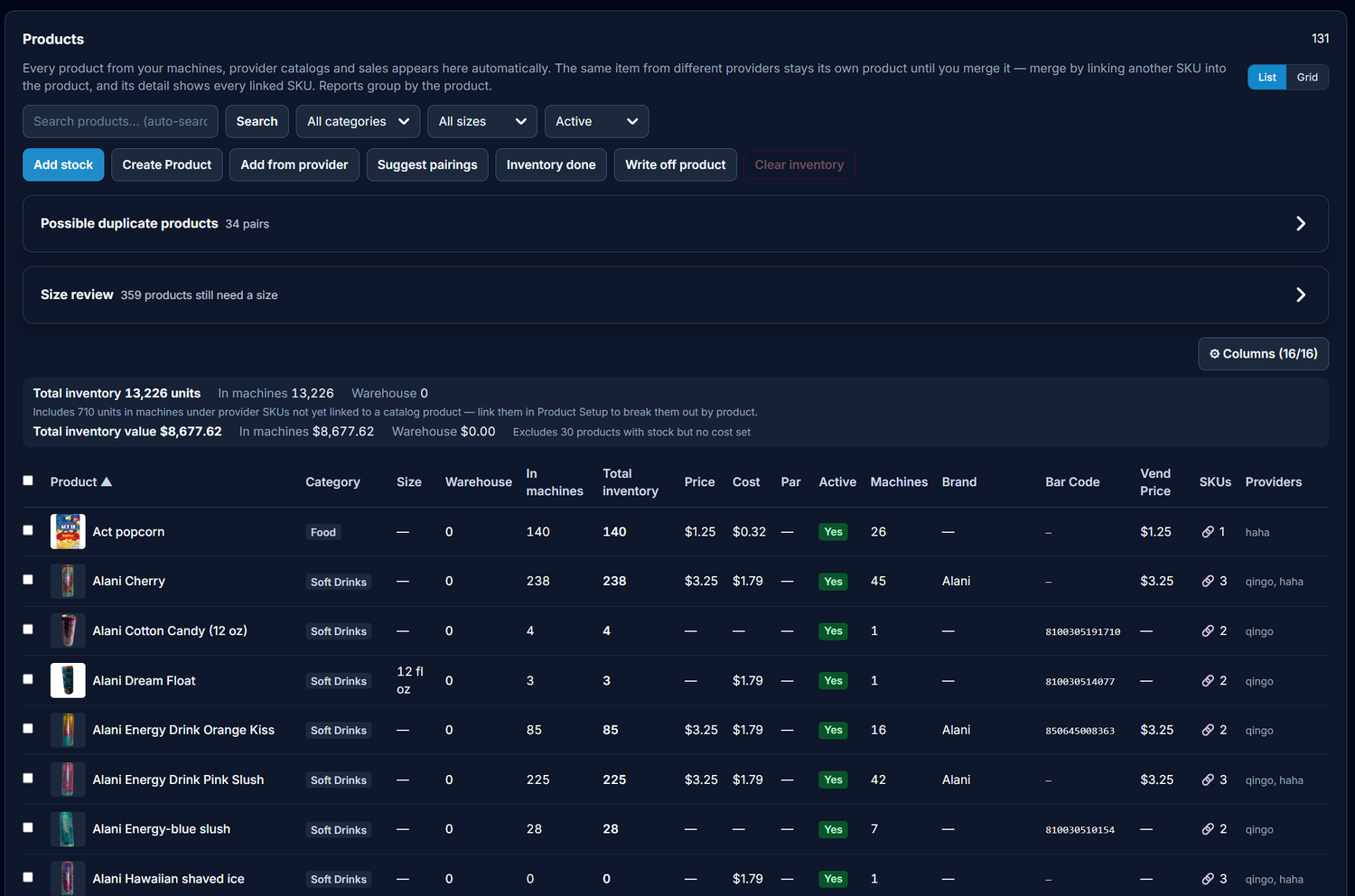
  • One products list — every provider's products land in a single list and merge when they're the same item. New products appear on their own, from sales and planograms.
  • Per-machine prices, always — a slot's price is what that cabinet charges, shown from that cabinet. Never a fleet-wide guess, never a catalog price dressed up as a cabinet price.
  • Fleet pricing — pick a product and see its price on every machine that carries it. Set them all to one price, nudge them all by the same amount, or price each machine individually — then push once and watch each machine verify.
  • Catalog prices stay in the catalog — a catalog price is edited in one place only (Products & Stocks) and pushes to that provider's catalog. It never silently reprices a cabinet.
  • A planogram board you can work — drag to swap slots, stage your edits, push once to the machine. Two-door machines get a planogram per door.
  • Bestsellers and slow sellers, flagged — each slot is judged against that machine's own pace, and a sold-out slot shows an estimate of the sales it's losing.
  • Templates, history & rollback — apply a planogram template across machines, and roll any machine's layout back to an earlier version if a change doesn't work out.
  • Planogram suggestions per machine — recommendations are built from what's already selling in that machine and what comparable machines prove — never the fleet's top seller stamped everywhere.
  • A planogram you can print — one clean page per door with stock, capacity and price, ready to hand to a driver.

Promotions & screens

  • Promotions that run on the machine — schedule a price promotion by product, category or machine, down to the days and hours. Prices change on the machine when the window opens and restore themselves when it closes.
  • A discount cap you set — decide the deepest discount your business allows; no promotion can go past it.
  • Deal designs for your screens — ready-made offer creatives in the sizes your cooler screens use, paired to the promotion so the deal on the screen matches the price being charged.
  • Your own creatives, fleet-wide — a creative library and a per-machine screen manager: deploy, replace or retire a campaign across your machines in a single run.
  • A loyalty program — run loyalty for your regular customers alongside your machines and markets.

Restocking, routes & drivers

  • Pre-kits that build themselves — refill lists generate from the latest telemetry, per door, and every line reads plainly: In Machine, Max, In Tote, and the expected total after the fill.
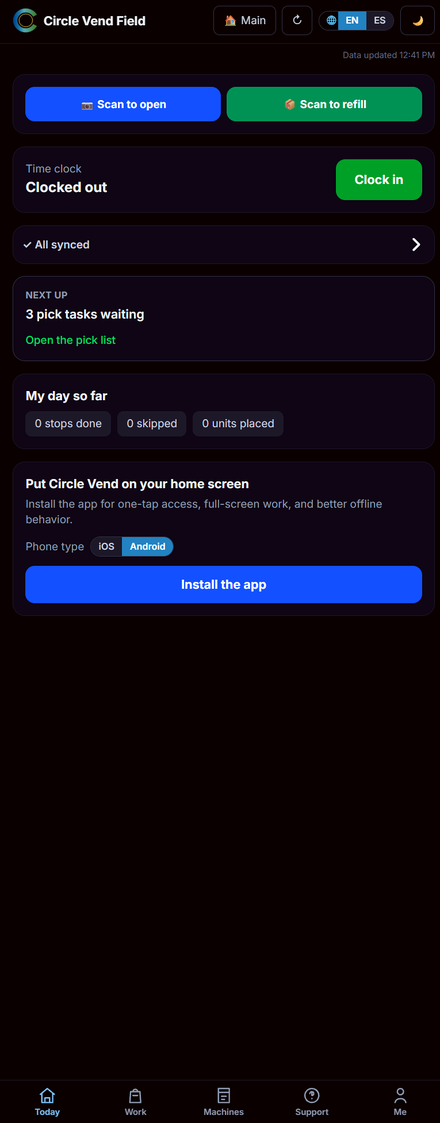
  • Scan to open — scan the manufacturer's QR already on a supported machine and the door opens. No menu, no extra taps: the scan is the act.
  • Scan to refill — one scan opens the door and lands on that machine's open pre-kit — or its stock adjustment when there's no list. Refill to par in one submit.
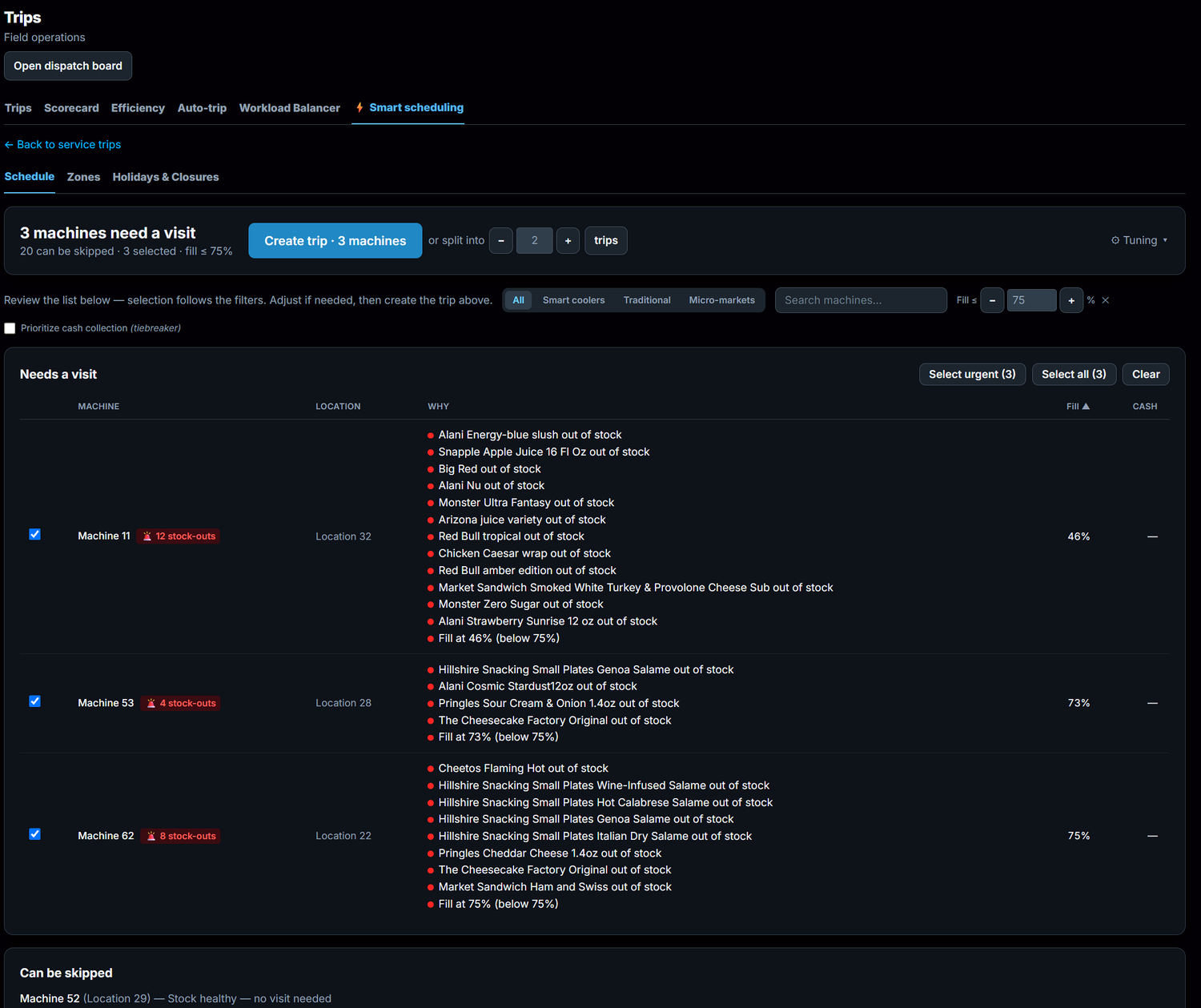
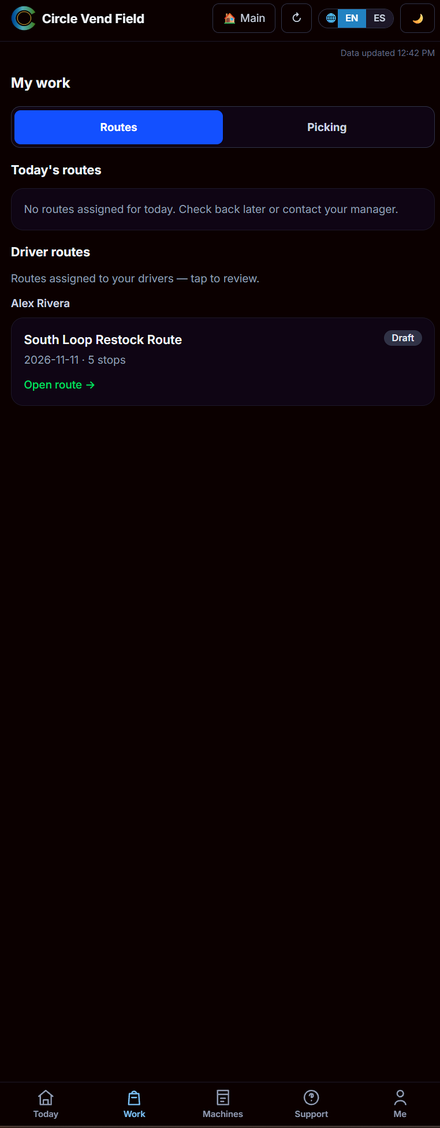
  • Trips your way — build trips by hand, or let Smart Scheduling pick the machines that need service and optimize the route, with time windows, ETAs and closed-day warnings.
  • Auto-trips — standing rules generate trips on their own (stock-outs, fill level), and a past trip that never ran can be revived and rescheduled instead of rebuilt.
  • One clear day for drivers — stops in order, what to load, what to push, door controls on the stop card, progress tracked stop by stop.
  • Picking by route — pick into totes by route, unpack and repack at the machine, with a zero/short guard before anything submits.
  • Works with no signal — pick lists, planograms and photos are pre-loaded on the phone. Fills, counts and photos queue offline and sync when the signal returns.
  • Time clock in the same app — drivers clock in and out in the field app; the office reviews hours and driver scorecards in the same platform.
  • Proof of the visit — a service photo after each stop (required, if you set it — one owner setting covers trips and refills alike).

Warehouse & purchasing

  • One inventory ledger — warehouse and in-machine stock in one place, with honest counts: a negative count shows as negative, because it means something sold that wasn't recorded.
  • Scan a receipt, stock the shelf — photograph a supplier receipt and the lines are read, matched to your products, priced per unit, and received into stock as a purchase order. The matching is learned, so the next receipt from that supplier matches itself.
  • Cases, units and splits — count a receipt line in cases with your units-per-case; split one line across several products; the per-unit cost lands on each product for you.
  • Receipts kept as expenses — every receipt and invoice is stored permanently as your expense record. Deleting archives it; only the archive can truly delete. Any scan can be re-run.
  • Club deals, caught for you — the Sam's Club and Costco savings books are read every week and matched against the products you actually stock.
  • Batches & expiry — stock is tracked by lot, oldest stock moves first, and an expiry view shows what's running out of time. Write-offs — expired, damaged, lost — always carry a reason and an audit trail.
  • Stock-takes from the phone — count the warehouse in a staged review; a variance needs a reason before anything commits.
  • Forecasting & the auto-merchandiser — demand forecasts look ahead, swap suggestions keep each machine's mix earning, and driver custody shows what every driver is carrying.
  • What your stock is worth — inventory value on hand, exportable for your accountant whenever they ask.

Money, commissions & accounting

  • Commissions that build themselves — per-location agreements: a percent of sales, a percent of gross profit, per item, or flat — with tiered volume bands when the deal calls for them.
  • Partner Shares — split a location's profit with a partner and produce their statement from the same numbers, no side spreadsheet.
  • Statements a location can see — branded statements shared with each location; the math shows, or stays amount-only, per location.
  • Route accounting — each trip collects the sales since the previous visit, so the numbers on a stop are the ones earned since your driver was last there.
  • Honest revenue — reports count money actually obtained: completed sales plus what was captured on partial ones. A $0 line never inflates a unit count.
  • Sales tax handled — tax types mapped by product category, a sales-tax report per location, and a P&L that deducts the full tax liability — it's a payment you owe, so it's treated like one.
  • Cash under control — cash reconciliation per machine and per trip, DEX-variance reconciliation, money-bag tracking and a day-end closeout. A sale counts as cash only when the payment actually says cash — smart coolers never invent a cash figure.
  • Expenses & team pay — log expenses and mileage, review card-reader fees, and run team pay from the hours and pay structures you set.
  • QuickBooks sync — sales receipts flow into your own QuickBooks, mapped to your accounts.
  • Employee allowances — give a location's people a balance on the cooler: PIN or card to open it, the balance pays first, and it resets on your schedule under a monthly budget cap you set. Import the roster from a spreadsheet; the location's contacts see balances and spending in their own portal.

Help at every machine. Around the clock.

Happier customers. Less work. Every request handled inside the same platform that runs your machines, sales and telemetry — not a separate add-on.

  • Text & voice — customers scan the machine's help sticker or text your Help Desk number; voicemail is transcribed and filed as a ticket automatically. A customer can reach you any hour — it lands as a ticket, not in your personal messages.
  • Refund management — requests queue for approve, decline or hold, and refund automatically after 5 business days if nobody acts first. Every refund is checked against the machine's real sales data before it goes out.
  • Customer history — a profile for every customer: conversations, refunds and feedback, including the survey that goes out after a ticket closes.
  • Equipment integration — every ticket is tied to the exact machine (and order) the customer used, and abnormal orders are flagged automatically.
  • Multi-language — the customer help page runs in English and Spanish; every customer-facing string translates.
  • Team collaboration — your whole team works one queue together: assign, reply and close from a single thread the customer never sees into.

The desk itself is part of the platform. The dedicated support phone line is enabled by direct arrangement.

Fleet & vehicles

  • Vehicle Tracking — live vehicle locations on the fleet map, with geofences around your locations.
  • Full vehicle health — the tracker sensor in each vehicle reports its health and raises an alert the moment an issue shows up, before it strands a driver.
  • Automatic mileage — every trip is recorded with its mileage and classified Business or Personal. No notebook in the cab.
  • Fuel & maintenance — a fuel log, fleet insights, maintenance schedules and a service record for every vehicle.
  • Share a live location — send a customer a live link to the vehicle on its way to them.
  • It replaces the other apps — driver time and location tracking live in the same service, so the separate time-clock and tracking subscriptions go away.

Reporting & insights

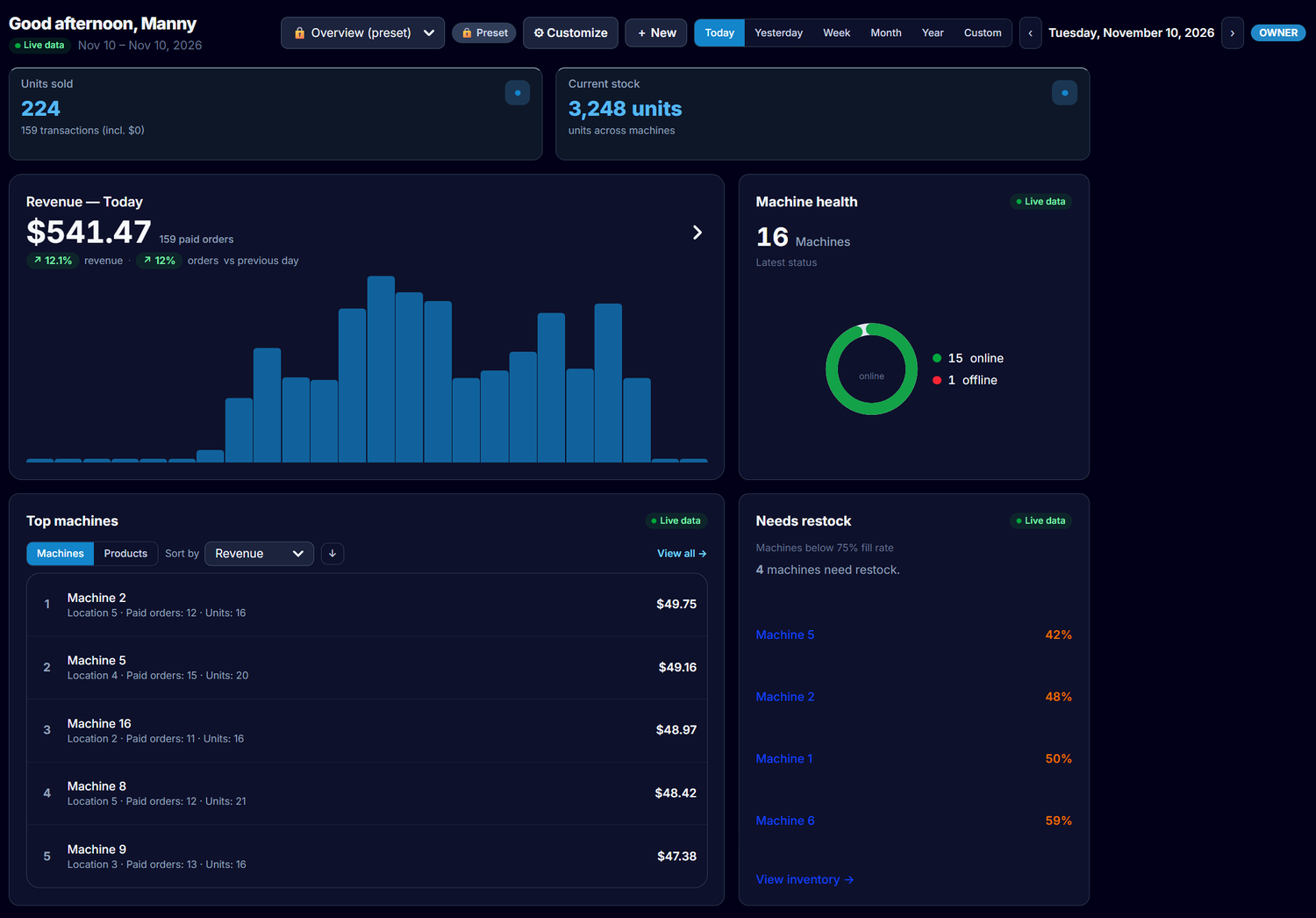
  • One period drives everything — pick Today, Yesterday, Week, Month, Year or a custom range once; every number on the page answers to it, on desktop and phone alike.
  • Rankings that act — revenue by machine and by product, top machines, what needs restocking, and fleet health, all from the same period.
  • The warehouse TV board — today's sales, the dispatch board and what needs attention, on the TV, refreshing itself.
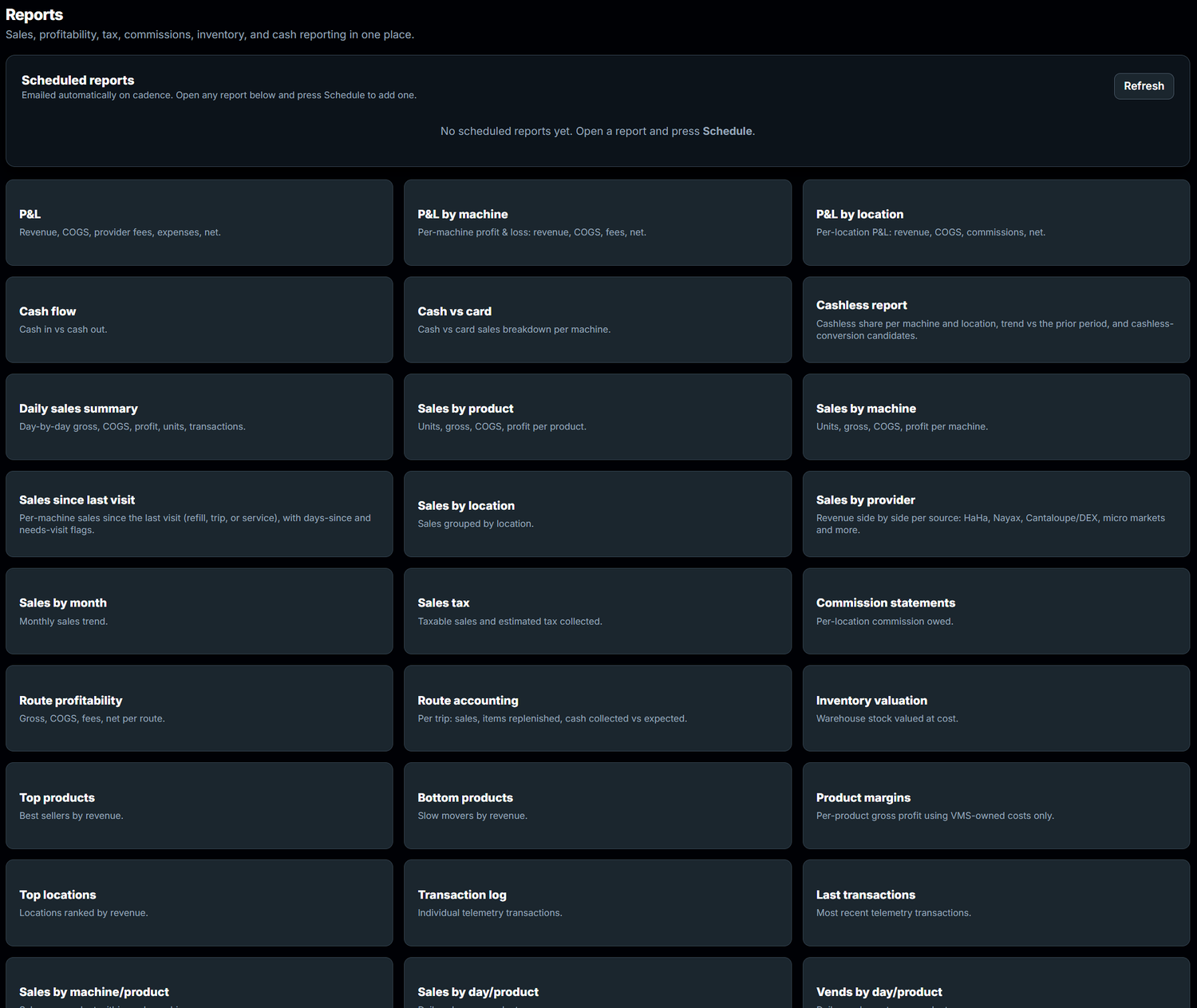
  • Scheduled reports — reports emailed on your schedule — daily, weekly, monthly — as PDF, CSV or in the email body, carrying your logo and colours, not ours.
  • A weekly anomaly digest — a quiet week says nothing. A strange one lands in your inbox with the machines that moved.
  • Shrinkage detection — telemetry sales, card settlements and counted cash are compared machine by machine; sustained divergence gets flagged, one-off noise doesn't.
  • Predictive maintenance — machines trending toward trouble surface as risk scores before they fail in front of a customer.
  • Peer benchmarks — opt into the anonymized data co-op and see your numbers against operators like you. Nothing aggregates until enough operators join to keep everyone anonymous.

Platform, people & access

  • Roles that fit your team — custom roles and permissions for owners, managers, drivers and office staff, on web and phone alike.
  • Money-blind by design — a driver can be kept from ever seeing revenue or margins — stripped by the server, not hidden by the screen. The Viewer role hands someone a safe look around with money and locations masked.
  • Branches & regions — group locations under branches; a branch manager sees only their branch, and branches compare side by side.
  • Your branding — your company name, logo and colour on statements, reports and trip sheets. Your customers see your business, not ours.
  • English and Spanish — the whole app switches language per person.
  • Notifications, assigned properly — the owner always hears about the important things; each alert type can also be assigned to specific people. Nothing is blasted to a whole role.
  • Bring your own AI agent — connect an AI assistant to your operation through Circle Vend's MCP server, with your own scoped key and every call audit-logged.
  • Your data stays yours — every business is isolated by design, your provider credentials are used for your fleet only, and an audit log tracks who changed what.

Grow & other lines

  • A prospect pipeline — from first call to signed location on one board, with places prospecting and scoring built in. One click turns a signed prospect into a real location.
  • Machine sales, in the same platform — sell machines on order-to-delivered tracking, with agreements sent for e-signature.
  • Office coffee service — brewers, standing orders, scheduled service visits and billing, run as its own line next to vending.
  • The apartment playbook — assortment templates and dayparts tuned for apartment-community placements.

See it running

Real screens from a live operation — the same views our own drivers and office run every day.
Connected to the platforms you already run.

Circle Vend integrates directly with the providers and systems below — sales, inventory, and machine health sync automatically, so the numbers on your screen are the numbers your machines reported. One platform, every fleet.

Smart coolers

Qingo logoSmart coolersTwo-way sync
HaHa logoSmart coolersTwo-way sync
SandStar logoSmart coolersTwo-way sync
Micromart logoSmart coolersTwo-way sync
XMAI logoSmart coolersTwo-way sync

Payments & telemetry

Nayax logoCard readers
Cantaloupe logoCard readers
Any DEX machineNAMA VDI 2.0 + DEX

Connectivity

OptConnect logoCellular connectivity

Built into Circle Vend

🛡️Shield24/7 monitoring & automatic fixes
☎️Help Desk24/7 customer help, tickets & refunds, built in.
🧾Receipt ScanningReceipts & invoices → purchase orders
📍Vehicle TrackingGPS, health, mileage & alerts
🏷️Club DealsWarehouse price checks
VendingMachineStatus.comMonitor uptime and outages
MCPBring your own AI agent

Abnormal orders, decided by a person

When a machine flags an order, a person reviews it — the video, the machine, the call. Nothing is auto-dismissed.

Circle Vend abnormal orders — flagged orders awaiting review and correction
Abnormal orders. Flagged orders queue for review and correction — a person decides every one.

The field app, in the driver's hand

Routes, pick lists and machine status on the phone — scan to open, scan to refill, and the day's work in one place.
Software companies guess. Operators know.

Circle Vend wasn't designed in a boardroom. Manuel Mojica runs a 7-figure vending operation — real machines, real drivers, real 5 a.m. warehouse mornings. Every feature in Circle Vend exists because a route needed it, and every screen is tested on live machines before it ships. When you talk to us, you're talking to people who stock coolers too.

Open to every operator.

Circle Vend is open now. Operators from the Vending Circle community and our machine customers came first — and every new fleet still gets a clean, guided onboarding.

  • Free to start — no card required
  • An additional month free before any billing starts
  • Direct line to the team building it (which, some days, is Manuel himself)

Frequently asked questions

Which machines and providers does Circle Vend support?

HaHa, Qingo, Sandstar, XMAI, and Micromart smart coolers connect today, with sales, inventory, and refill data syncing automatically. Traditional machines are covered too — Circle Vend integrates with Cantaloupe and Nayax. Tell us what you run and we'll get you set up.

How much does it cost?

Nothing to start. Early members will receive an additional free month before launch pricing begins, and founding members will hear about pricing from us first — no surprises.

Do I have to be a Vending Circle member?

No. Vending Circle members and our machine customers got the first invitations, but Circle Vend is open to any operator.

I'm already using other software. Can I switch?

Yes — and you won't do it alone. Reach out when you're ready and we'll help carry your machines, products, and locations over.

Who's behind Circle Vend?

Circle Vend is built by the same team behind the Vending Circle mentorship community.

Your route, run right.

Circle Vend by Vending Circle · MM Tech Ventures, LLC

Privacy Policy · Terms of Service